n8n vs Zapier for AI Automation: Which Should Your Business Use?

Published on
Most n8n vs Zapier debates end with "it depends." That is true, but it is not useful when you have a budget to approve and a workflow to ship.
Here is the short answer. Zapier is the faster, easier pick for simple automations across lots of SaaS apps. n8n is the stronger pick for complex, high-volume or data-sensitive AI workflows, especially AI agents that need custom logic.
In this guide I compare both tools on the things that actually change your decision: pricing at scale, AI agent features, integrations, security and who will maintain the workflows once they go live.
n8n vs Zapier at a Glance
If you only read one section, read this table. Prices are the published entry points at the time of writing, so check the vendors' pages before you commit.
Factor | n8n | Zapier |
|---|---|---|
Best for | Technical teams, complex logic, AI agents | Non-technical teams, fast setup, simple flows |
Billing unit | Per execution (one full workflow run) | Per task (each successful action step) |
Free option | Self-hosted Community Edition | Free plan with 100 tasks a month |
Entry paid plan | Starter, €20/month billed annually, 2,500 executions | Professional, from $19.99/month |
Integrations | 1,000+ native nodes, plus HTTP and custom nodes | 9,000+ apps |
Hosting | Cloud or self-hosted | Cloud only |
Code support | JavaScript and Python in the Code node | Code steps with tighter limits |
AI agents | AI Agent node, MCP, human approval for tool calls | Zapier Agents, Copilot, AI steps, Zapier MCP |
Learning curve | Steeper | Gentle |
What Is n8n?
n8n is a workflow automation platform with a visual node editor and a fair-code license. You can run it on n8n Cloud or host it yourself on your own server.
It feels closer to a developer tool than a no-code app. You see the JSON moving between steps; you can drop in JavaScript or Python, and you can call almost any API with the HTTP Request node.
That flexibility is why n8n has become a favorite for building AI agents. It has a dedicated AI Agent node, LangChain-based building blocks, MCP support and the option to run local models.
What Is Zapier?
Zapier is a fully managed, cloud-only automation platform. You connect a trigger in one app to actions in others, and Zapier handles hosting, uptime, retries and security for you.
Its biggest strength is reach. With over 9,000 app integrations, there is a good chance every tool your team uses is already supported.
Zapier has also grown well beyond simple "if this, then that" flows. It now offers AI steps inside Zaps, Zapier Agents, Chatbots, Tables, Forms, Copilot for building Zaps from plain language, and Zapier MCP for connecting AI tools to its app library.
Pricing: Executions vs Tasks
This is where most teams feel the difference, and it comes down to what each tool counts.
n8n counts executions. One execution is one complete run of a workflow, no matter how many steps it has. A 3-step workflow and a 30-step workflow cost the same per run.
Zapier counts tasks. A task is used each time an action step completes successfully. Triggers, failed steps and built-in tools like Filter, Formatter and Paths do not count, according to Zapier's own pricing and task rules.
A simple worked example
Say you have an AI lead-qualification workflow with one trigger and nine action steps. It runs 3,000 times a month.
- On n8n: 3,000 executions. That fits inside the Pro plan's 10,000 monthly executions.
- On Zapier: up to 27,000 tasks (9 actions x 3,000 runs), minus any steps that use free built-in tools. You would need a task tier far above the entry plan.
At a few hundred runs a month, this gap barely matters. At thousands of runs with long, multi-step AI workflows, the billing unit often decides the platform on its own.
Current plan snapshot
Based on n8n's published pricing page, n8n Cloud Starter is €20/month (billed annually) for 2,500 executions and Pro is €50/month for 10,000. The Business plan is self-hosted and adds SSO, Git version control and higher limits. The Community Edition is free to self-host.
Zapier's Free plan includes 100 tasks a month. Professional starts at $19.99/month and Team starts at $69/month with up to 25 users. Higher task volumes move you into higher tiers. Zapier Agents and Chatbots are priced as separate add-ons, each with a free starting tier.
One thing to watch on both sides: self-hosting is not free in practice. You still pay for the server, monitoring, backups, updates and the person who looks after it.
AI Automation: Which One Handles AI Better?
Both tools can call large language models, summarize text, classify tickets and draft replies. The difference shows up when you move from "AI step inside a workflow" to "AI agent that decides what to do next."
Where n8n is stronger for AI
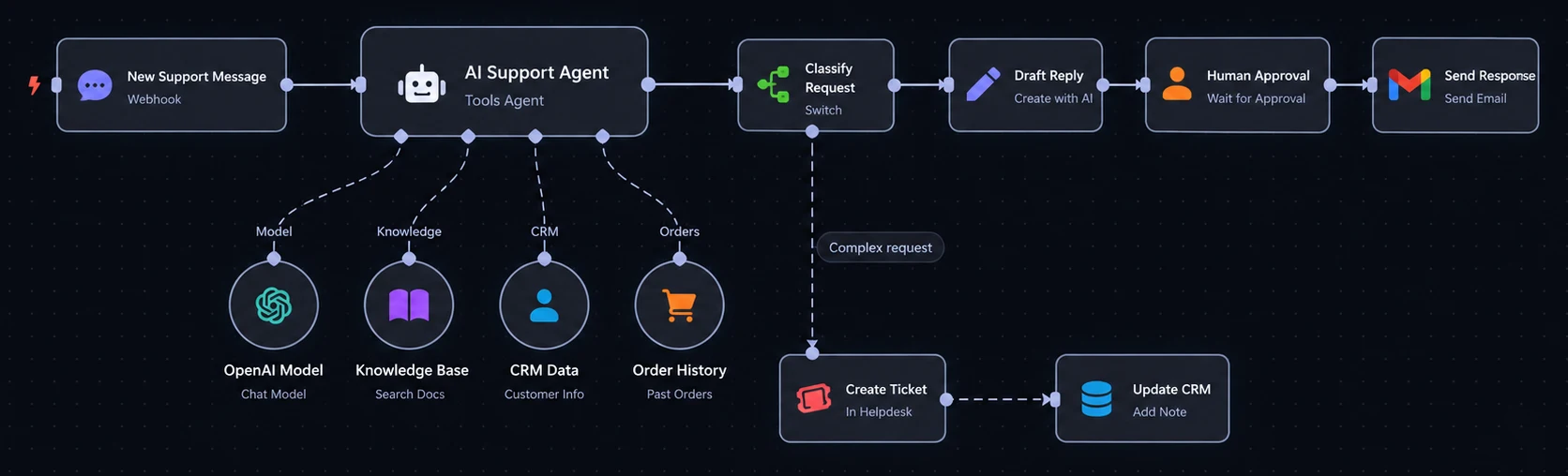
- Agent building: The AI Agent node lets an agent pick tools, call APIs and loop until the job is done. You can chain multiple agents together.
- Model choice: You can connect OpenAI, Anthropic, Google and other providers, or run local models on self-hosted setups.
- RAG and memory: Vector store, embeddings and memory nodes make it practical to build agents that answer from your own documents.
- Control: Human approval for tool calls, error workflows and built-in evaluations help you test agents before trusting them.
Where Zapier is stronger for AI
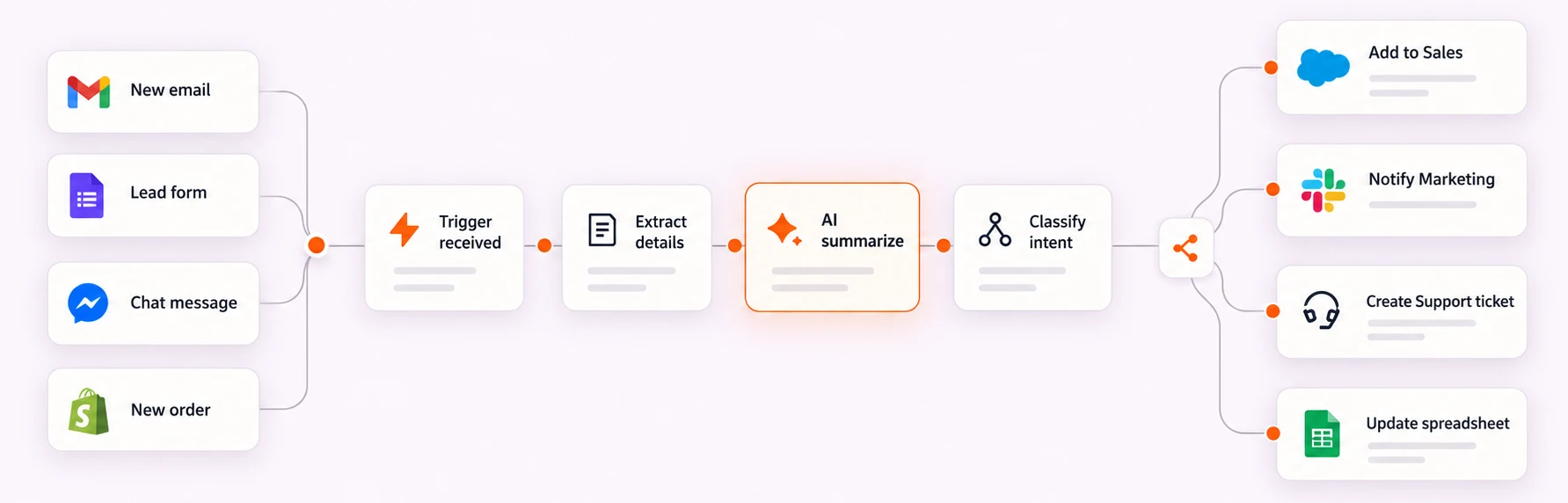
- Speed to value: A marketer can add an AI step to an existing Zap in minutes, with no JSON in sight.
- App reach for agents: Zapier Agents and Zapier MCP can act across its huge app library, which matters if your agent needs to touch many niche SaaS tools.
- Guardrails out of the box: Managed security, credential handling and AI guardrail options mean less setup for teams without engineers.
My take: if the AI part is a single smart step (summarize, tag, draft), Zapier is usually enough. If the AI part is the whole product, like a support agent or a research agent with tools and memory, n8n gives you more room to build it properly. If you are still deciding whether you need an agent at all, our comparison of an AI agent vs a chatbot walks through that choice.
Integrations and Custom Logic
Zapier wins on raw numbers. Its catalog is several times larger than n8n's, and its connectors are maintained by Zapier and its partners.
n8n closes much of that gap with its HTTP Request node, webhooks and community nodes. If an app has an API, n8n can usually talk to it, but someone needs to set up the request.
For logic, n8n is more flexible. Loops, merges, sub-workflows, complex branching and code steps are all first-class features. Zapier covers branching with Paths and filters, which is plenty for most business flows but can feel tight for heavy data work.
Security, Compliance and Data Control
This is often the deciding factor for teams in healthcare, finance, legal or any business handling sensitive customer data.
- Zapier is cloud-only. Your data passes through Zapier's infrastructure, which is backed by managed security and compliance certifications. You get less control over where data lives, but far less to maintain.
- n8n self-hosted keeps workflow data and credentials inside your own environment. That is a big plus for data residency, but security becomes your job, including patching. Features like SSO and advanced permissions sit on paid plans.
- n8n Cloud sits in the middle: managed hosting, but with n8n's pricing model and AI features.
If your data cannot leave your servers, self-hosted n8n is the clear option. If you would rather not own infrastructure at all, Zapier is the safer bet.
Ease of Use and Who Maintains It
Zapier is built for people who do not want to think about data structures. Its step-by-step editor and Copilot make it easy for ops, sales and marketing teams to build and fix their own Zaps.
n8n rewards technical comfort. You will work with expressions, JSON and API docs. That is not a problem for a developer, but it can stall a non-technical team.
The question I would ask is simple: who fixes it at 9 p.m. when it breaks? If the answer is "someone in marketing," lean Zapier. If you have, or plan to hire, an automation specialist, n8n becomes much more attractive.
Which One Should Your Business Use?
Use this quick test. Count how many statements are true for each side.
Choose Zapier if:
- Your workflows are short and run a few hundred to a few thousand times a month
- You rely on many SaaS apps, including niche ones
- Your team is non-technical and wants to self-serve
- You want zero infrastructure to manage
- AI is a helper step, not the core of the workflow
Choose n8n if:
- Your workflows are long, run often, or both
- You are building AI agents with tools, memory or RAG
- You need custom code, loops or complex branching
- Data residency or self-hosting matters to you
- You have technical people, in-house or freelance, to build and maintain it
Plenty of businesses end up using both. Zapier handles quick team-level automations, while n8n runs the heavier AI and data workflows in the background.
What About Make?
Make often comes up in the same conversation. It sits between the two, with a visual scenario builder that handles branching well and credit-based pricing that is usually cheaper than Zapier at volume.
It is cloud-only like Zapier, so it does not solve self-hosting needs. If Make is on your shortlist, you can bring in Make automation specialists to compare it against your actual workflows.
Common Mistakes When Choosing
- Comparing only the entry price. The plan that looks cheaper at 100 runs can be the most expensive at 10,000. Estimate runs and steps first.
- Ignoring maintenance. Self-hosted n8n needs updates, backups, and monitoring. Budget time or a person for it.
- Picking a tool before mapping the workflow. Write down the trigger, steps, apps, and data involved. The right tool often becomes obvious.
- Overbuilding the first version. Start with one workflow that saves real hours, prove it, then expand.
How to Get Your First AI Workflow Live
Whichever tool you pick, the setup work looks similar. Map the process, choose the trigger, connect the apps, add the AI step or agent, then test with real data before switching it on.
If you do not have that skill in-house, you can hire AI automation and workflow experts on Botpool. For tool-specific work, you can go straight to n8n developers or experienced Zapier experts, depending on where you land.
Before you post the job, it helps to know how to write a clear AI project brief and what a fair rate looks like, which our guide on the cost of hiring an AI freelancer breaks down. If your plan includes a full agent, our AI agent development cost breakdown will help you set a realistic budget.
Not sure where to start at all? These repetitive business tasks you can automate with AI are a good list of first projects.
Frequently Asked Questions
Is n8n more powerful than Zapier?
For complex logic, custom code and AI agents, yes. n8n gives you more control over how a workflow runs. Zapier is more powerful in app coverage and ease of use, so "better" depends on what your workflows need.
Is n8n considered AI automation?
Yes. n8n is a general workflow automation tool, but it has native AI features, including an AI Agent node, LLM integrations, vector stores, memory and MCP support. Many teams use it mainly to build AI agents.
Is n8n cheaper than Zapier?
Often, at higher volumes. n8n charges per full workflow run while Zapier charges per action step, so long workflows that run often tend to cost less on n8n. For small, simple automations the difference is usually minor.
Is n8n free?
The self-hosted Community Edition is free to use, but you pay for your own server and maintenance. n8n Cloud and the Business and Enterprise plans are paid.
Does Zapier use n8n?
No. Zapier and n8n are separate, competing platforms built by different companies. They can connect to each other through webhooks or APIs, but neither runs on the other.
Which is better, n8n, Make or Zapier?
Zapier suits non-technical teams with simple, app-heavy workflows. Make suits visual builders who want strong branching at a lower cost. n8n suits technical teams running complex, high-volume or self-hosted AI workflows.
Can I switch from Zapier to n8n later?
Yes, but there is no one-click migration. Each Zap needs to be rebuilt as an n8n workflow, so plan time for rebuilding and testing, especially for business-critical automations.
Final Thoughts
Zapier and n8n are both strong tools. They are just built for different people and different stages of growth.
Pick Zapier when speed, simplicity, and app coverage matter most. Pick n8n when you need control, custom AI agents and better economics at scale. And if you want the workflow built right the first time, browse AI business automation freelancers on Botpool and start with one workflow that pays for itself.
